
Introduction
Drone mapping has become essential across industries—agriculture, construction, mining, urban planning, utilities, and environmental monitoring. With tools like OpenDroneMap (ODM), it is now possible to process raw drone images into highly accurate geospatial outputs such as orthomosaics, DSM, point clouds, and 3D models.
Once an orthomosaic is generated, the next step is to display it on a web map for analysis. Among all web-mapping libraries, OpenLayers stands out as one of the most powerful and flexible options for building professional 2D mapping applications.
This blog explains what an orthomosaic is, why OpenLayers is an excellent choice, and how you can display ODM-generated ortho tiles on top of OpenStreetMap.
What Is an Orthomosaic in Drone Mapping?
An orthomosaic is a geometrically corrected, high-resolution image created by stitching hundreds of drone photos. ODM automatically removes distortions caused by camera angles and terrain, producing a map-accurate image where:
- Scale is uniform
- Measurements are correct
- Every pixel has real-world coordinates
- It aligns perfectly with GIS basemaps
Common Use Cases of Orthomosaics
- Land surveying and site planning
- Agriculture (crop health, field boundaries, pest monitoring)
- Construction progress tracking
- Mining (stockpile analysis, site monitoring)
- Disaster assessment
- Asset inspection
- Environmental studies
Why Use OpenLayers for Displaying Orthomosaics?
1. High Performance for Large Maps
OpenLayers is designed for GIS-grade performance. It can handle large raster tiles, vector layers, and real-time overlays more efficiently than Leaflet or Mapbox GL (for pure 2D map needs).
2. Native Support for GeoTIFF, WMTS, and XYZ Tiles
ODM can export orthomosaics as:
- GeoTIFF
- Tiled XYZ structure (via
--tiles)
OpenLayers easily loads these formats without additional libraries.
3. Advanced 2D GIS Features Built-In
You can seamlessly add:
- Measurement tools (distance/area)
- Annotation layers (points, polygons, labels)
- Layer opacity control
- Swipe/compare tool
- Feature editing and snapping
- Heatmaps and vector styling
4. Full Customization & Open Source
No vendor lock-in, no expensive credits. A perfect choice for enterprise or offline systems.
How to Display ODM Orthomosaic on OpenLayers
ODM generates tiled outputs inside:
/odm_orthophoto/tiles/
Here’s a simple example to load those tiles in OpenLayers on top of OpenStreetMap:
<!DOCTYPE html>
<html lang="en">
<head>
  <title>ODM Orthomosaic on OpenLayers</title>
  <link rel="stylesheet" href="https://cdn.jsdelivr.net/npm/ol@latest/ol.css" />
  <style>
    #map { width: 100%; height: 100vh; }
  </style>
</head>
<body>
<div id="map"></div>

<script src="https://cdn.jsdelivr.net/npm/ol@latest/dist/ol.js"></script>
<script>
  // Base map (OpenStreetMap)
  const osmLayer = new ol.layer.Tile({
    source: new ol.source.OSM(),
  });

  // ODM orthomosaic tiles (XYZ)
  const orthoLayer = new ol.layer.Tile({
    source: new ol.source.XYZ({
      url: '/odm_orthophoto/tiles/{z}/{x}/{y}.png',
      crossOrigin: 'anonymous'
    }),
    opacity: 0.8
  });

  const map = new ol.Map({
    target: 'map',
    layers: [osmLayer, orthoLayer],
    view: new ol.View({
      center: ol.proj.fromLonLat([77.5946, 12.9716]), // update with your area
      zoom: 16
    })
  });
</script>
</body>
</html>
Optional Enhancements
You can add all the tools your users need:
- Distance/Area measurement (using
ol/interaction/Draw) - Annotations (points, polygons, popups)
- Layer switcher
- Opacity slider
- Side-by-side comparison (before/after orthomosaic)
OpenLayers makes all this very simple to implement.
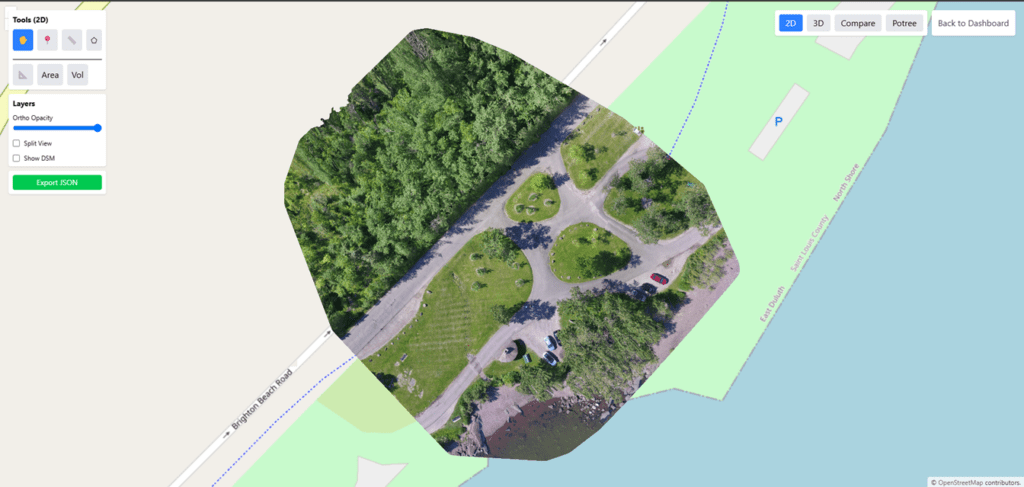
Output: Professional 2D Web Map
Using ODM + OpenLayers, you get a fully functional 2D map viewer that can:
- Display large drone-generated orthomosaics
- Overlay shapefiles, KML, GeoJSON, PostGIS data
- Add advanced tools for measurement and analysis
- Work online or offline (local network / local server)
- Integrate with enterprise workflows
Perfect for drone surveying, analytics dashboards, urban planning, and asset management.
Conclusion
OpenDroneMap lets you process drone images for free, and OpenLayers allows you to display those outputs on a powerful interactive map. Together, they provide a complete end-to-end solution for building professional drone-mapping applications without relying on expensive SaaS platforms.
If you need a custom drone mapping software—cloud-based or fully offline on your premises—Manya Technologies provides cost-effective solutions that are far more affordable than DroneDeploy, Pix4D, and other commercial tools.
We build:
- Custom 2D/3D map viewers
- ODM-based automated processing pipelines
- Drone data dashboards
- Field apps
- Enterprise GIS integrations
Contact Manya Technologies to build your own fully customized drone mapping platform.