
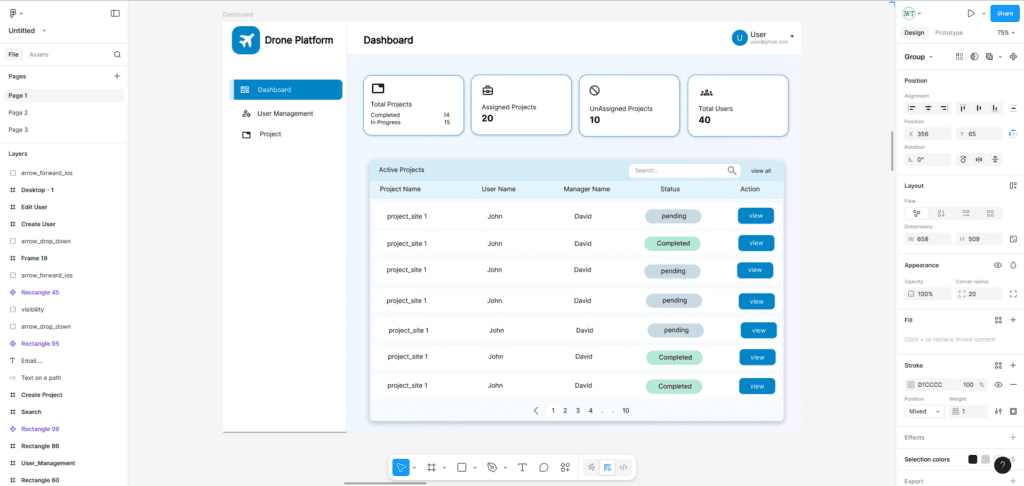
When building any digital product—especially something complex like a web-based drone mapping software—the first and most important step is creating a wireframe. Wireframes act as the backbone of your product’s user interface, helping you structure your ideas clearly before a single line of code is written.
In this article, we’ll explain what wireframes are, why they matter, how they help in drone-mapping applications, and the best tools you can try right now.
What Is a Wireframe?
A wireframe is a simplified, visual blueprint of a digital interface.
Think of it as a rough sketch of your web or mobile application.
It usually includes:
- Page layout
- Placement of buttons, maps, icons, menus
- Navigation flow
- Where interactions will occur
Wireframes do not focus on colors, branding, or detailed graphics. Their goal is structure, clarity, and planning.
Benefits of Wireframing
1. Clear Understanding of Requirements
Wireframes translate text-based ideas into a visual format.
Stakeholders, developers, and designers instantly understand the product vision.
2. Faster Development
By fixing layout and flows early, you reduce rework later.
Developers get precise guidance on what to build.
3. Saves Time & Cost
Catching design issues at the wireframe level is much cheaper than changing code in later stages.
4. Improves User Experience
You can test different layouts and workflows before development.
This results in a smoother, more intuitive product.
5. Perfect for Complex Applications
Drone mapping tools involve maps, side panels, layers, tools, controls, 3D views, playback timelines, and more.
Wireframes help organize everything neatly.
Why Wireframes Are Essential for Custom Web-Based Drone Mapping Software
Drone mapping software includes advanced UI components such as:
- Map viewer (OpenLayers, Leaflet, CesiumJS)
- Layer management
- Drone flight path planning
- Uploading orthomosaic/DEM/DSM
- Measurements (distance, area, elevation)
- Point cloud viewer integration
- 2D/3D switching
- Real-time drone position tracking
Without wireframes, the UI can become cluttered and confusing.
Wireframes help you:
✔ Plan map layout vs tool panels
✔ Place toolbar icons meaningfully
✔ Design timeline controls for drone playback
✔ Structure GCP uploading, processing, and results pages
✔ Improve workflow for survey → upload → process → visualize
For teams building enterprise drone software, wireframing avoids miscommunication and speeds up delivery.
How to Use Wireframes in Your Drone Mapping Project
- Define user roles
- Pilot, GIS analyst, admin, customer
- List features
Example: upload drone images → generate orthomosaic → visualize on map. - Create the main screens
- Dashboard
- Project list
- Map viewer
- Tools panel
- Settings
- Reports page
- Sketch layouts
Start very rough—pen & paper or simple box sketches. - Convert to digital wireframes
Using any tool (list below). - Review with team/client
Iterate until everyone agrees. - Move to mockups & development
Best Tools for Creating Wireframes (Free & Paid)
⭐ Cloud-Based & Collaborative Tools
These tools work directly in the browser and support real-time teamwork.
1. Figma (Highly Recommended)
- Cloud-based and fully collaborative
- Free plan is enough for basic wireframes
- Huge template library
- Great for both wireframes and full UI designs
2. Penpot (Free & Open Source)
- 100% free and open-source UI/UX design platform
- Cloud-based with team collaboration
- Supports wireframes, prototypes, components
- Ideal alternative to Figma for teams wanting open-source tools
3. Whimsical
- Fast and simple for quick UI sketches
- Cloud-based collaboration
- Good for early-stage ideas
4. Draw.io / Diagrams.net
- Free browser-based tool
- Simple UI for quick layouts
- Supports Google Drive collaboration
⭐ Desktop or Offline Tools
5. Balsamiq
- Desktop app with simple, sketch-style wireframes
- Very beginner-friendly
- Paid but affordable
6. Pencil Project (Open Source)
- 100% free desktop software
- Good for basic wireframes
7. Adobe XD
- Feature-rich UI/UX tool
- Good for designers familiar with Adobe products
- Desktop-based with cloud sharing
Conclusion
Wireframes help you convert your ideas into a clear, structured visual plan. For advanced applications like custom drone mapping software, wireframes ensure your interface is user-friendly, optimized for workflows, and ready for professional development.
If you need help designing UI/UX for your drone mapping or GIS applications Contact Manya Technologies
We specialize in UI/UX design, drone mapping workflows, GIS applications, and custom web-based solutions. Our team can help you create clean, intuitive layouts that turn your ideas into powerful software.