
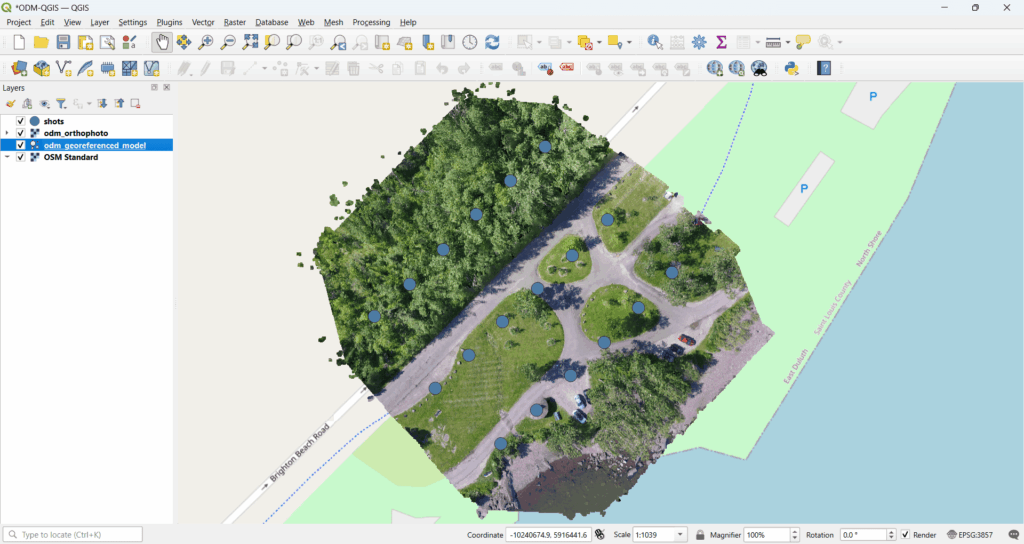
Drone mapping has become a core technology across surveying, infrastructure, agriculture, mining, smart cities, and defense applications. While photogrammetry software like Pix4D or OpenDroneMap is used to generate orthophotos and point clouds, QGIS plays a crucial role in visualization, analysis, and delivery of drone mapping outputs.
In this blog, we explain how QGIS is used for drone mapping display, from loading orthophotos to publishing results on the web and 3D platforms.
Where QGIS Fits in the Drone Mapping Workflow
A typical drone mapping workflow looks like this:
- Drone image capture
- Photogrammetry processing (ODM, Pix4D, Metashape)
- Output generation:
- Orthophoto (GeoTIFF)
- DSM / DTM
- Point cloud (LAS / LAZ)
- Visualization, analysis & publishing using QGIS ✅
QGIS does not replace photogrammetry engines, but it is one of the best open-source platforms for working with drone mapping results.
1️⃣ Load Orthophoto (GeoTIFF) in QGIS
Orthophotos generated from drone images are usually delivered as GeoTIFF files.
Steps:
- Open QGIS
Layer → Add Layer → Add Raster Layer- Load the orthophoto GeoTIFF
What QGIS provides:
- Accurate georeferenced display
- Support for large raster datasets
- Fast zoom, pan, and layer styling
- CRS reprojection on the fly
You can overlay drone orthophotos with satellite imagery, cadastral maps, or survey data easily.
2️⃣ Overlay Vector Layers (Boundaries, Roads, Parcels)
QGIS allows seamless integration of vector layers on top of drone orthophotos:
Common vector layers:
- Land parcel boundaries
- Roads and utilities
- Survey points
- Administrative boundaries
- Asset locations
Supported formats:
- Shapefile
- GeoJSON
- KML
- PostGIS layers
This is extremely useful for land surveys, urban planning, and infrastructure projects, where drone imagery must align with legal or engineering data.
3️⃣ Measure Distances, Areas, and Volumes
Drone orthophotos combined with DSM/DTM enable accurate measurements.
In QGIS, you can:
- Measure distance (roads, pipelines, boundaries)
- Measure area (plots, fields, construction zones)
- Calculate cut & fill volumes using DSM/DTM
- Extract elevation profiles
QGIS measurement tools are widely accepted for preliminary planning and reporting.
4️⃣ Classification and Change Detection
QGIS supports advanced raster and vector analysis using built-in tools and plugins.
Typical use cases:
- Land-use / land-cover classification
- Vegetation analysis
- Built-up area detection
- Temporal change detection (before vs after surveys)
Tools used:
- Raster Calculator
- Semi-Automatic Classification Plugin (SCP)
- Orfeo Toolbox
- QGIS Processing Framework
This is highly valuable for agriculture, mining monitoring, environmental studies, and disaster assessment.
5️⃣ Create Maps and Professional Reports
One of QGIS’s strongest features is cartographic output.
You can create:
- High-resolution survey maps
- Orthophoto maps with annotations
- Measurement reports
- PDF and print-ready layouts
Using Print Layout, you can add:
- Scale bars
- North arrows
- Legends
- Coordinates grid
- Company branding
This helps deliver client-ready outputs without expensive software licenses.
6️⃣ Integrate Drone Data with PostGIS
For enterprise and large-scale projects, QGIS integrates seamlessly with PostgreSQL/PostGIS.
Benefits:
- Centralized drone data storage
- Multi-user access
- Versioned updates
- Live data synchronization
- Large area management
Drone orthophotos, vector layers, and metadata can be stored and accessed directly from PostGIS, making it ideal for government and defense deployments.
7️⃣ Point Cloud Visualization in QGIS
QGIS supports LAS / LAZ point cloud visualization.
Capabilities include:
- 3D point cloud rendering
- Classification-based coloring
- Elevation filtering
- Profile extraction
This allows users to analyze terrain, buildings, vegetation, and structures without switching tools.
8️⃣ Publish Drone Mapping Data to Web & 3D Platforms
QGIS enables multiple publishing options:
🌐 Web Publishing
- QGIS Server (WMS/WFS)
- Tile generation (XYZ / WMTS)
- Integration with web GIS platforms
🌍 3D Visualization
- Export to Cesium
- Combine orthophotos + terrain + 3D models
- Real-time web visualization of drone surveys
This makes QGIS ideal for building Pix4D-like web platforms using open-source technology.
Why Use QGIS for Drone Mapping Display?
✅ Open-source and cost-effective
✅ Industry-proven GIS platform
✅ Supports large raster & point cloud data
✅ Integrates with PostGIS and web systems
✅ Customizable using Python & C++
✅ Ideal for government, enterprise, and defense use
How Manya Technologies Helps
At Manya Technologies, we specialize in:
- Custom drone mapping visualization tools using QGIS
- Integration of OpenDroneMap / Pix4D outputs
- PostGIS-based enterprise GIS systems
- Web & 3D drone data publishing (Cesium, QGIS Server)
- Custom GIS application development using Qt & QGIS API
If you are planning to build custom drone mapping software or a web-based platform, we can help you design and implement it using scalable, open-source technologies.
📩 Get in touch
Visit manyatechnologies.com to discuss your drone mapping or GIS application requirements.